Workload placement: how to choose between Azure, Azure Local and on-premises
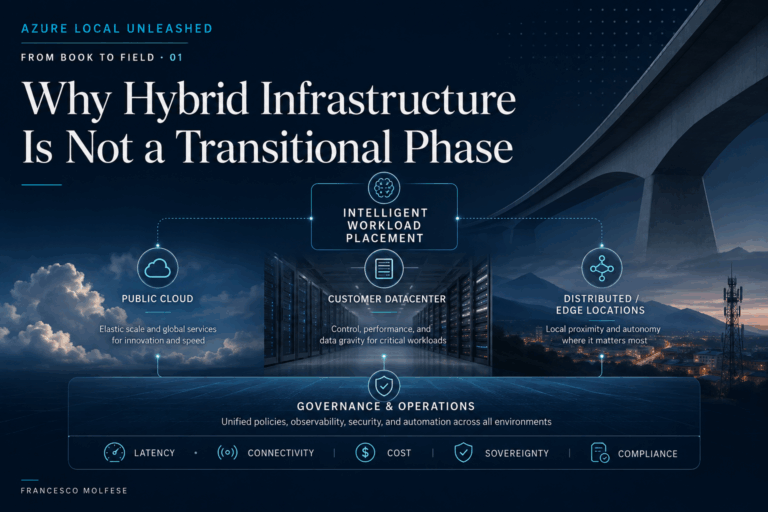
In the first article of this series we started from a principle: the future of enterprise IT won’t be defined by the opposition between cloud and on-premises, but by the ability to place each workload where it can generate the most value.
That statement, however, raises an inevitable question: how do you actually decide where to run a workload? Azure, Azure Local and traditional on-premises infrastructure can all be valid choices. The problem arises when the decision is approached by starting directly from the platform, without having first defined the overall model within which those platforms will have to coexist.
Workload placement isn’t simply a sequence of independent decisions taken application by application. Strategy comes first. The workload comes second.
The principle I’d start from is therefore this:
Workload placement starts with understanding the application, but within a clearly defined operating model.
Operating model first, workload second
When an organization embarks on an infrastructure modernization journey, the first decision rarely concerns a single application. The discussion normally starts at a higher level: which infrastructure and operating model do we want to adopt? The answer may be predominantly cloud, heavily oriented towards local infrastructure or — as happens more and more often — hybrid.
This choice defines the perimeter within which individual workloads will subsequently be assessed, but it shouldn’t automatically determine their destination.
Adopting a hybrid model, for example, doesn’t mean deciding up front that a certain percentage of applications must run in public cloud and the rest on-premises. It means building an architecture and an operating model capable of using different environments coherently, and then letting the characteristics of each workload determine the most appropriate placement.
This is the point at which you really get into the specifics of the application.
Who uses it? From which locations? Which other systems does it communicate with? How sensitive is it to latency? What happens if connectivity to the cloud is interrupted? What data does it handle? What’s its growth profile? How business-critical is it? What’s its lifecycle?
Placement therefore emerges from the meeting of a cross-cutting infrastructure strategy and the specific characteristics of the workload.
The strategy defines the model you operate within. The workload determines where, inside that model, it makes the most sense to run.
This distinction also helps avoid two opposite mistakes: building the entire strategy around a single platform, or treating every application as a completely independent case and losing coherence in governance, security and operations.
There’s no single placement criterion
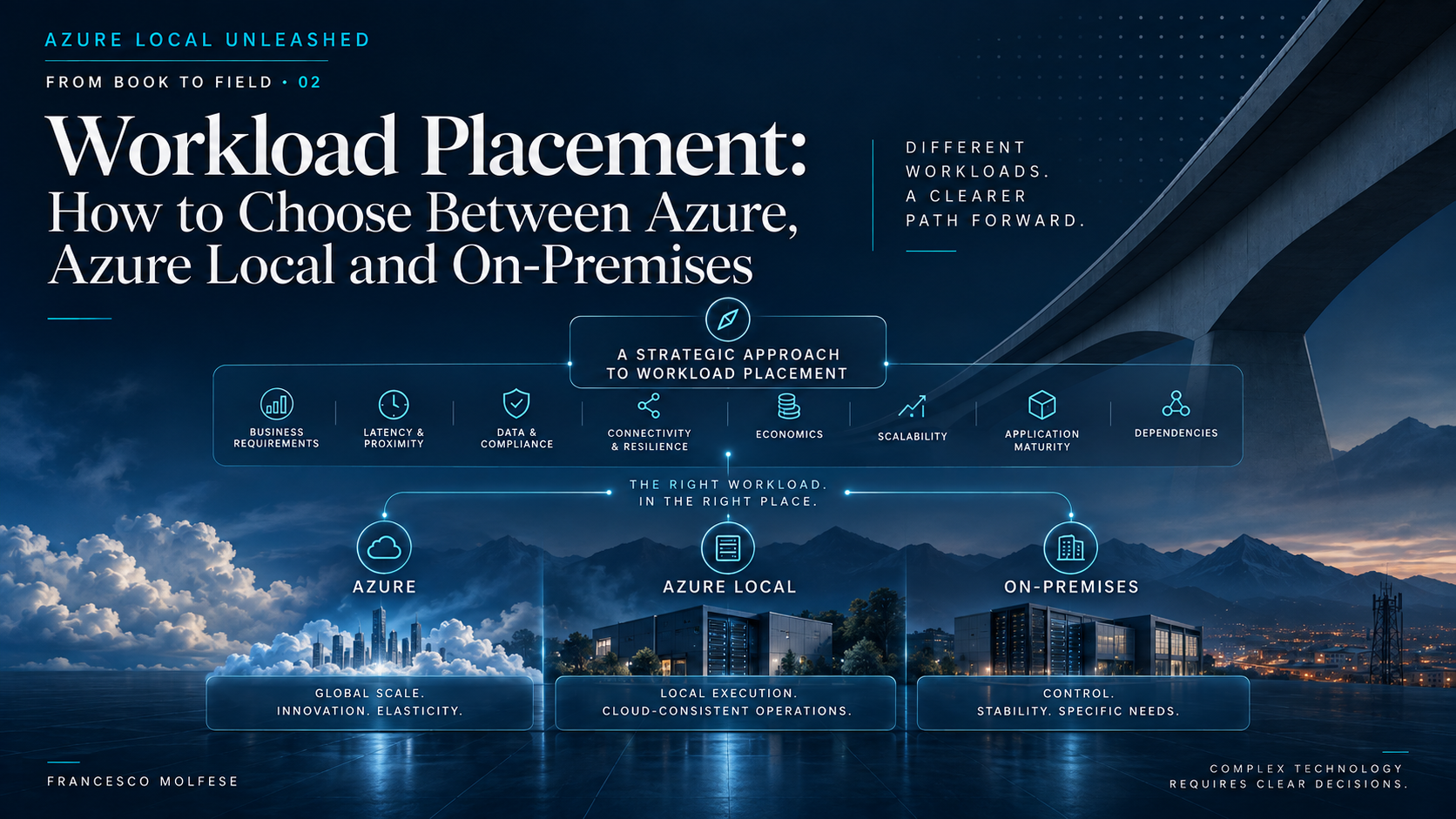
Once the overall model has been defined, each individual workload has to be assessed across several dimensions.
The first is latency. Some applications can tolerate tens or hundreds of milliseconds with no significant consequences. Others can’t. An administrative system has completely different requirements from a MES application interacting directly with a production line, or from a video analytics platform that has to process images in real time.
Directly linked to latency is proximity. Applications and data may depend on machinery, sensors, factory systems, users or other services that physically remain at a given site.
Then there are application dependencies. A virtual machine rarely lives alone: it talks to databases, file shares, middleware, directories, legacy systems, industrial devices and external services. Migrating a single component without understanding this web of relationships can simply move the problem rather than solve it.
Another fundamental dimension is connectivity. It isn’t enough to ask whether a site has an Internet connection. You have to ask what happens to the business process when that connectivity degrades or drops.
Then come data sovereignty and compliance. In some scenarios they’re one factor among many in the decision; in others they become a genuine architectural constraint, capable of ruling certain alternatives out outright.
Finally, the cost profile. A stable, predictable workload has completely different characteristics from one that requires highly variable capacity. Here too, the most cost-effective platform can’t be determined without first understanding how the application behaves.
Workload placement therefore means balancing latency, proximity, dependencies, connectivity, sovereignty, compliance, economics, resilience, scalability and lifecycle all at the same time.
Rarely does any one of these dimensions, taken on its own, provide the answer. It’s usually their combination that reveals the right placement.
When Azure is the natural choice
Public cloud probably delivers its greatest value when the goal isn’t simply to move existing infrastructure, but to take advantage of capabilities that would be hard to replicate locally with the same speed and the same simplicity.
I’m thinking, for example, of developing new cloud-native applications, using PaaS services, data platforms and — increasingly often — AI-related services.
In these scenarios, the value of Azure doesn’t come only from the availability of compute capacity. It comes above all from immediate access to an ecosystem of services that can significantly accelerate the innovation journey.
Global reach can be decisive too. An application aimed at geographically distributed users can benefit from a global infrastructure in a way that’s hard to compare with anything you could reasonably build and maintain yourself.
Then there’s elasticity. If a workload is characterized by highly variable demand, sizing local infrastructure for the peak means buying capacity that may sit unused much of the time. In public cloud, capacity can instead follow demand far more naturally.
This doesn’t mean Azure is automatically the right destination for every new application. It means that when elasticity, speed of innovation, availability of managed services and geographic distribution are the main drivers, public cloud often starts with a significant advantage.
When Azure Local becomes particularly interesting
There are also workloads that need to stay close to where they’re used or to where the data is generated.
This is where Azure Local introduces a particularly interesting option: keeping execution local without necessarily giving up an operating model that’s coherent with the organization’s Azure strategy.
The most obvious case is latency.
Think of real-time AI video analysis, or of systems that directly control a production line. The data originates in the plant and often has to be processed in the same place. Increasing the available bandwidth to the cloud doesn’t remove physical distance, and therefore doesn’t solve the latency problem.
A second element is operational continuity. If losing connectivity to the cloud can stop a production process or a critical service, keeping execution local can become an architectural requirement.
Azure Local also becomes interesting when the organization has chosen a hybrid model and wants to reduce the operational distance between what runs in the datacenter and what lives in public cloud. Virtual machines and containerized workloads can stay local, while governance, policy, security and lifecycle can be brought into a more coherent, cross-cutting model.
This is an important point: Azure Local isn’t simply an intermediate solution between Azure and traditional on-premises.
It makes sense when local execution is necessary or advantageous and, at the same time, there’s value in adopting an operating model integrated with Azure.
If either of those two elements is missing, the choice needs to be assessed carefully.
When traditional on-premises still makes sense
Thinking workload by workload also means accepting that Azure Local isn’t automatically the best choice every time an application has to stay local.
If an organization sees no real value in a hybrid model, doesn’t foresee significant workloads in public cloud and has no need for an operating model integrated with Azure, a traditional platform can remain a perfectly rational choice.
The same applies to certain legacy workloads, or to applications heavily constrained by vendor support requirements.
The point isn’t to use the newest technology.
It’s to use the one that best answers the problem and fits properly into the overall strategy.
Where workloads are stable, requirements are traditional and the operating model is well established, introducing a new platform without a concrete benefit simply risks adding complexity.
Modernization must always have a purpose. If cloud integration doesn’t produce value, it shouldn’t be adopted as a matter of principle.
Three workloads, three different decisions
An effective way to appreciate how much placement depends on context is to look at three different situations.
When Azure avoids freezing the datacenter in place
A services company with around 550 employees was running about a hundred virtual machines on a three-node cluster. The hardware would be out of support within a few months.
The decision might have looked simple: buy a new cluster.
Analyzing the application context, however, brought two important elements to light. The first was a seasonal demand peak of roughly five times the normal load for a few weeks each year. The second was that the organization had already planned to move its ERP to a SaaS model within about two years, which would remove a significant portion of the existing VMs.
Sizing new local infrastructure for five years would therefore have meant buying capacity needed only for a brief peak and destined, over time, to sit unused.
The choice was Azure.
In this case, public cloud allowed capacity to follow the evolution of the workload: absorbing the peak when needed and scaling down progressively as applications were decommissioned or transformed.
When the workload requires local execution
A manufacturing company operates across multiple plants and uses MES and supervisory systems directly connected to the production lines.
The main requirement was extremely clear: the control loop required latencies incompatible with running the workload in public cloud. On top of that, previous WAN connectivity outages made it necessary to guarantee operational continuity even without a link to Azure.
In this scenario, public cloud wasn’t simply less cost-effective. It didn’t meet the requirement.
The choice was Azure Local in the plants.
Latency-sensitive workloads stay close to the production lines and can keep operating locally. At the same time, instead of creating completely independent platforms with different management, update and security processes, the infrastructure is brought into the hybrid operating model defined by the organization.
The other workloads, not subject to the same constraints, can run directly in Azure.
This is probably one of the clearest examples of workload placement: not choosing one platform for the entire company, but using different platforms within the same operating model.
When the best choice is not to force the migration
A logistics company with around 420 employees runs about seventy VMs, covering ERP, file servers, warehouse systems and vertical applications. Here too, the hardware was approaching end of support.
The real constraint, though, wasn’t infrastructural. It was at the application level.
The ERP vendor didn’t support the customer’s version on Azure. Getting there would have required a major upgrade, with a review of customizations, rebuilding of integrations and user training.
The application project was already planned, but not in the immediate term.
Forcing the migration would have meant tackling the infrastructure change and the major application upgrade at the same time, concentrating two different risks on the system underpinning one of the company’s most critical processes.
The decision was therefore far more pragmatic: a contained refresh of the on-premises infrastructure, improved data protection, disaster recovery in Azure, and the introduction of management tools consistent with the future direction.
The platform will be reassessed after the ERP upgrade.
Infrastructure lifecycles and application lifecycles don’t always coincide. Trying to force them into the same time window can generate more risk than benefit.
Cost has to be measured, not assumed
The economic factor always deserves its own analysis.
Too often the starting point is one of two opposite beliefs: “cloud costs less” or “cloud costs more.”
Both are oversimplifications.
A stable, predictable workload has a very different economic profile from one with sharp fluctuations. Oversized local infrastructure can carry hidden costs exactly as a cloud environment left to grow without governance can.
Personally, I prefer to work with at least a three-year TCO, including infrastructure and licensing and, where the data allows, the main operational components as well.
The goal isn’t to determine which platform costs less in absolute terms, but to understand which economic model is most consistent with how the workload behaves over the period analyzed.
Cost, then, isn’t a property of the platform either. It’s the result of the meeting between platform and workload.
A two-level framework
Ultimately, the decision process can be reduced to two distinct levels.
Level 1 – Define the operating model
Before discussing the placement of individual applications, the organization should clarify a number of cross-cutting principles:
- what role public cloud and local infrastructure should play;
- which governance model to adopt;
- how to manage identity and security;
- which tools to use for monitoring and observability;
- what level of automation to pursue;
- how to manage lifecycle and compliance;
- what degree of dependency on cloud connectivity is acceptable.
This level sets the rules of the game.
Level 2 – Assess each workload
Within that model, every workload should be analyzed across at least these dimensions:
| Dimension | Question to ask |
|---|---|
| Latency | How sensitive is the application to distance from the systems it communicates with? |
| Proximity | Does it need to stay close to users, machinery, data or physical processes? |
| Connectivity | What happens if the link to the cloud degrades or drops? |
| Sovereignty / Compliance | Are there constraints on data location, control or processing? |
| Economics | Is demand stable, variable, or marked by significant peaks? |
| Scalability | How quickly can capacity requirements change? |
| Lifecycle | Do the application’s timelines coincide with the infrastructure’s? |
| Dependencies | Which components have to move together for the placement to really make sense? |
The result shouldn’t be a universal ranking of Azure, Azure Local and on-premises.
It should be a choice consistent with the overall model and with the characteristics of the workload.
Placement can change, but it isn’t automatically reversible
In the first article we highlighted how workload placement is less final today than it was in the past.
The idea still holds, but it should be used with care.
Not all workloads can be moved freely from one environment to another. Application architecture, the services in use, dependencies, networking and data volumes can all make a migration extremely complex.
Reversibility shouldn’t therefore be presented as an automatic property of hybrid cloud.
It should instead become an architectural principle: avoid, wherever possible, decisions that needlessly eliminate future options.
That doesn’t mean being able to move everything at any time. It means designing today in a way that doesn’t make tomorrow’s change impossible.
Technology is not the destination
Workload placement isn’t a competition between Azure, Azure Local and traditional infrastructure.
There’s no platform that wins in absolute terms, because there’s no universal workload.
But nor is there an infrastructure strategy built simply by adding up a series of independent, application-by-application decisions.
You need a model first.
A model capable of establishing how cloud and local infrastructure should coexist, how resources should be governed, protected and monitored, and which principles must remain consistent regardless of where execution takes place.
Within that model, each workload can then find its own place.
A cloud-native application with a strong need for elasticity may find its natural environment in Azure. A latency-sensitive industrial system may require local execution and benefit from the Azure Local operating model. A legacy application with support constraints may make keeping a traditional infrastructure for the time being perfectly rational.
The quality of the decision depends on the ability to connect strategy and workload characteristics, without sacrificing one to the other.
Modernizing doesn’t mean adopting more technology or moving everything to the cloud. It means building a coherent operating model, understanding what matters for each application, and placing workloads, data and capabilities where they can generate the most value today, while preserving the ability to evolve tomorrow.